
What makes leveling hard?
It's rarely the fighting. It's deciding: which zone now, which of twenty quests first, where that one NPC stands, whether this cave is too high for you. Every decision is a pause, a guide in another window, or a corpse run when you guess wrong. Take the deciding away and leveling becomes what it should be: playing.
Below are the nine things that make 1 to 60 in WoW: Forever easy, and how WispXP, a leveling addon for WoW: Forever and WoW Classic, does each of them for you inside the game.
1. Always know the next step
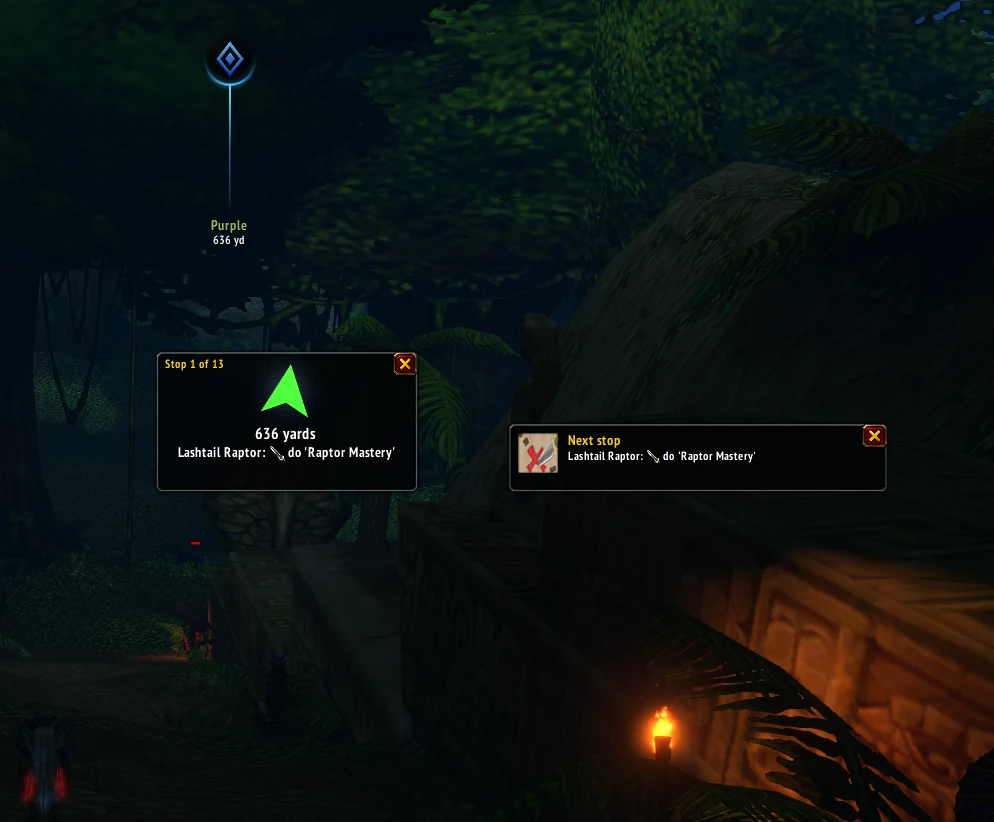
Press Continue leveling. WispXP looks at every quest you can take now, the ones in your quest log included, your level and where you stand, and makes the plan with the most XP per minute: the zone, the stops in the fastest order, the minutes and the XP. A big arrow walks you to each stop and the game's own map pin and marker show it. After every quest you take or hand in, it plans again from where you are.
2. Level where you don't die
Most deaths while leveling come from one thing: a quest in a camp of monsters a few levels above you. WispXP checks the monsters around every quest's work, not just the quest's level, and leaves out quests whose monsters are more than four levels above you. It prefers solid zones at or a little below your level, where monsters die faster and you rest less. Fewer deaths is fewer corpse runs, and that's real time. Want it safer still? Tick Play it safe in Settings: quests and monsters at most 2 levels above you, no escort quests and no mob farms above your level.
3. Fewer clicks at every quest giver
Talk to a quest giver and WispXP hands in your finished quests and takes the ones worth taking, by itself (grey quests, group quests and ones far above you it leaves to you). When you get to choose a reward, the choice stays yours. Hold Shift if you want to do a quest giver yourself.
4. Relax in lower zones when you feel like it
Some evenings you don't want to push. Type a lower level in the Level box next to Continue leveling (or /wisp level 15) and WispXP plans as if you were that level: an old favourite zone, quests that are easy for you, no rush. The plan tells you honestly how much XP those quests still give you. One click on Back to my level and you're on your real route again.
5. Skip zones you don't like
Don't feel like the Swamp of Sorrows again? Press Ignore this zone in the plan and WispXP leaves it out from then on and looks further. You can see and undo every ignored zone under Settings.
6. Know your pace
A small XP banner under the arrow measures your XP per minute and per hour while you play, for your plan and for everything you do, and says when your next level comes: "Level 37 in about 2 h". No spreadsheets, no guessing.
7. Dungeons without homework
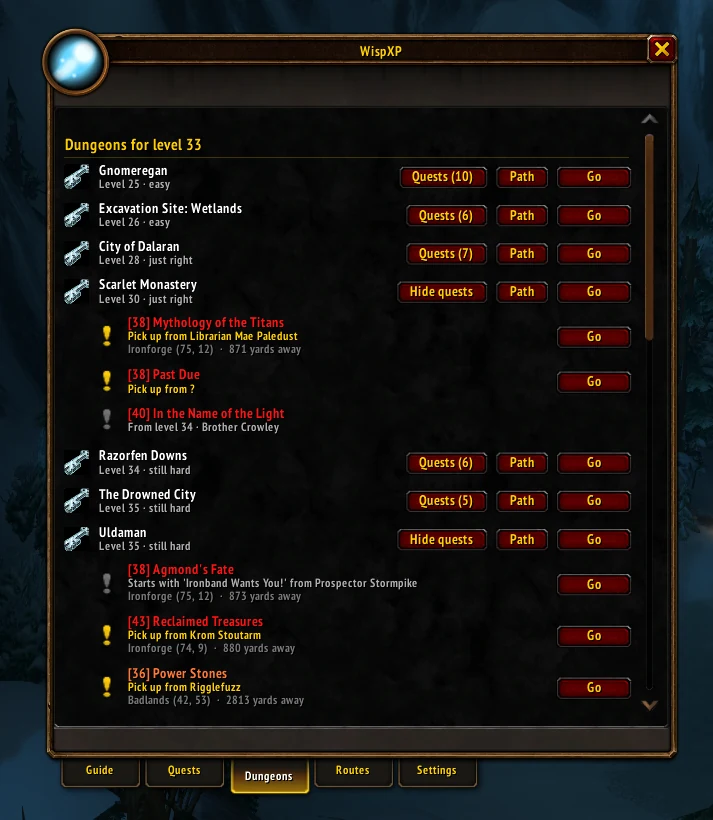
The Dungeons tab lists the dungeons the game's own group finder offers at your level, each with its quests and where to pick them up. Some dungeon quests start with a chain of earlier quests; WispXP shows the chain ("step 2 of 7") and walks you through it until the dungeon quest is in your log. Inside, Dungeon Path shows the way to each boss, and after a run you see the XP it gave you from monsters.
8. In your own language
WispXP speaks English, Dutch, German, Spanish, Italian, Polish and French. Under every step the arrow says what to do in plain words: "Kill 8× Kobold Vermin (3/8)", "Kill Defias Thug and loot 6× Red Linen Bandana", "Right-click Marshal McBride: the quest goes into your log by itself". The names stay the game's, so they match what you see.
9. Stuck on a quest? One click
Every quest in WispXP's Quests tab has Go (the way to its work, or to whoever you hand it in to) and Copy: its name and a video link, ready to paste in your browser, for the one quest you just don't get.
Need something else on the way? The Find row (City, NPC, Monster, Item, Dungeon, Trainer and More) asks which one and walks you there, and the Food, Repair, Flight master and Sell buttons next to Continue leveling take you to the nearest one.
Where to level, by level
If you'd rather choose a zone yourself, see where to level at every level and every zone with its quests. And if you want the whole picture first, the WoW: Forever leveling guide 1 to 60 has zones, dungeons and routes for both factions.
Easy leveling, from level 1
WispXP is free up to level 20, with every feature. Pro covers every level to 60. The WispXP app for Windows installs the addon in the right folder and keeps it up to date.
Questions
What is the easiest way to level 1 to 60 in WoW: Forever?
Quest in zones at or a little below your level, batch your quests by area, and let an addon plan the route. WispXP picks the zone, orders every stop, walks you there with an arrow and says in plain words what to do at each stop. It plans again after every quest and level.
Can I level casually in lower zones in WoW: Forever?
Yes. In WispXP, type a lower level in the Level box next to Continue leveling (or /wisp level 15) and it plans as if you were that level. The plan shows the XP you really get for those quests.
Is WispXP free?
Free up to level 20, with every feature. Pro covers every level up to 60: €14.95 a month.
Does WispXP work in other languages?
Yes: English, Dutch, German, Spanish, Italian, Polish and French. Every step says what to do in your language, for example "Kill 8× Kobold Vermin".
